4월 05, 2016

operator [][] 구현

operator[][] function은 존재 X

overloading 할 수 있는 여러 종류의 operator function이 있지만, operator [][] function은 존재하지 않음. 다만 직접 [][]의 overloading이 불가능할 뿐이지 간접적인 방법으로는 overloading 가능

operator[][] overloading

operator [][]를 구현하려는 클래스의 operator[]를 overloading 해서 중간에 거쳐가는 객체(임시 클래스)를 리턴하도록 하고, 이 클래스의 operator[]를 오버로딩하면 operator[][]를 구현 가능.

references

3월 31, 2016

C++ 11 이후 새로운 random 함수 표준

MT(Mersenne Twister 메르센 트위스터)

  • 유사 난수 생성기. 기존 생성기의 문제점을 피하며 매우 질이 좋은 난수를 빠르게 생성 가능.
  • 32bit(MT19937), 또는 64bit(MT19937_64) 크기의 난수 생성 가능.
  • 난수의 특성(주기, 난수의 범위 등)을 알고 있으면 그 뒤 나올 난수를 예측 가능하기 때문에 암호학적으로 안전한 생성기는 아님.
  • 예시1
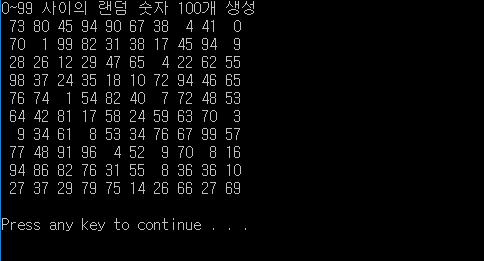
  • 출력 화면
  • 예시2 - C++ 표준을 좀 더 다양하게 사용한 개선 코드
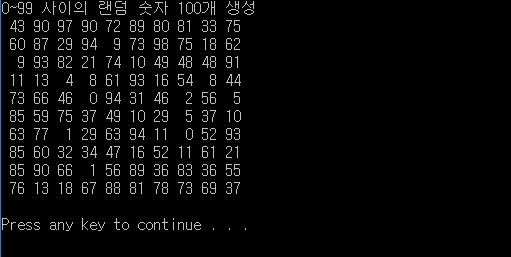
  • 출력 화면

WELL

  • MT의 개발자가 10년 후에 고안한 난수 발생 알고리즘.
  • MT보다 40% 가량 빠르며 코드도 더 간단하다고 함.
  • 분포도에 따라 WELLS512, WELLS1024, WELLS19947(숫자가 커질 수록 분포도↑) 등 다양한 종류가 존재.

references

3월 29, 2016

constructor/destructor와 assignment operator가 (자동으로) implicit define되지 않는 경우.

  • default constructor
    • 하나라도 직접 정의한 constructor가 있을 때
    • 클래스 멤버 중에 default constructing이 불가능한 멤버가 있을 때( ex. reference, const object 등)
  • copy constructor
    • 직접 정의한 copy constructor(class T에 대해 T, T&, const T&를 받는 constructor)가 하나라도 있을 때
    • 클래스 멤버 중에 copy constructing이 불가능한 멤버가 있을 때( ex. reference 등)
    • 직접 정의한 move constructor 나 move assignment op가 있을 때
  • copy assignment operator
    • 직접 정의한 copy assignment op(class T에 대해 T, T&, const T&를 받는 op)가 하나라도 있을 때
    • 클래스 멤버 중에 자동으로 assign이 불가능한 멤버가 있을 때( ex. reference, const object 등)
    • 직접 정의한 move constructor 나 move assignment op가 있을 때
  • destructor
    • 직접 정의한 destructor가 있는 경우
  • move constructor
    • 직접 정의한 move constructor가 있는 경우
    • 클래스 멤버 중에 move가 불가능한 멤버가 있는 경우( ex. deleted/inaccessible/ambiguou 등)
    • 직접 정의한 copy constructor, copy assignment op, destructor, move assignment op가 있는 경우
  • move assignment operator
    • 직접 정의한 move assignment op가 있는 경우
    • 직접 정의한 copy constructor, copy assignment op, destructor, move constructor가 있는 경우


references

3월 24, 2016

git internals: refs

refs 란?

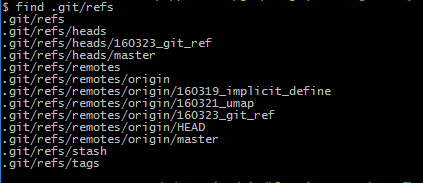
SHA-1 값을 알면 이를 통해 해당 commit 및 전체 히스토리를 살펴볼 수 있음. 기억하기 힘든 SHA-1 값 대신 외우기 쉬운 이름으로 된 파일을 만들고 파일에 SHA-1 값을 기록했는데, 이것이 git의 refs 임. 이런 refs 들은 .git/refs 디렉토리에 저장됨.

  • .git/refs/heads: local branch 이름의 파일이 생성. 파일에는 해당 브랜치에서 head가 가리키는 commit의 SHA-1이 저장됨.
  • .git/refs/remotes: remote branch 이름의 파일이 origin 디렉토리 안에 생성됨. 파일에는 해당 브랜치에서 head가 가리키는 commit의 SHA-1이 저장됨.
  • .git/refs/tags: tag 이름의 파일이 생성됨. 파일에는 해당 태그가 가리키는 commit의 SHA-1이 저장됨.

더 알아볼 것

  • git reflog
  • git update-ref

reference

3월 22, 2016

move semantic 구현

move constructor와 move assignment operator를 정의

move constructor를 정의

  • move constructor
  • move constructor의 경우moved-to-obj의 리소스를 해제하고 그 자리에 move-from-obj의 리소스를 배정. move-from-obj의 리소스 참조를 끊어줌.(ex. pointer를 nullptr로 변경)

  • move assignment operator
  • move-to-obj와 move-from-obj가 동일한 객체인지 검사하고 동일하지 않은 객체일 경우 이동 작업을 진행.


코드의 간략화

move assignment operator를 이용해 move constructor의 중복 코드를 제거할 수 있음.


기타

  • move constructor의 move-from-obj destruct
  • 일반적으로, move constructor에서 move-from-obj를 destruct 해주지는 않음. 그러나 move constructor가 불린 후 꼭 move destructor가 뒤따라 불리는데, 이건 move constructor가 move-from-obj를 destruct해서가 아니라 함수에서 임시로 생성됐던 객체가 move constructor가 불린 후 life time이 끝나 해제가 된 것. move constructor에서 move-from-obj의 destruct해야할 어떤 책임도 없음.


rvalue를 param.로 받는 함수를 overloading.

perfect forwarding?


references

3월 21, 2016

superscript (윗첨자), subscript (아랫첨자) 삽입하는 방법. (markdown/html)

순수 markdown 문법

  • superscript: ^(text)^
  • subscript: ~(text)~

만약 text 사이에 공백이 있다면 공백에 \ (escape) 처리를 해줘야 함. ex) ^hello\ world!^


html tag 사용

markdown에서는 위의 문법을 지원하지 않는 경우가 있음. github 에서는 위의 문법을 지원하지 않는데, 이런 경우엔 html tag를 사용. markdown 뿐 아니라 html에서도 사용 가능.

  • superscript: <sup>superscript</sup>
  • subscript: <sub>subscript</sub>

3월 11, 2016

git environment initializing after installing : git 설치 후 초기 설정


user email, user name setting

git config --global user.email
git config --global user.name


push option setting

--simple / --match option 중 선택.


git's default editor setting

Visual studio code를 default editor로 설정.

git config --global core.editor="'(dir)/code.exe' -w"

-w 옵션은 editor가 종료될 때까지 git이 기다린다는 의미. git이 어떤 명령을 실행하는 중에 editor가 실행되었다면, editor가 종료된 이후에 나머지 프로세스가 진행됨.


특정 프로그램의 path를 git bash에 추가.

git을 default editor로 세팅한 이후에는 git bash에서 VS code 실행 가능. code를 통해 VS code 실행하거나 code . 명령어로 현재 폴더를 프로젝트 폴더로 지정하여 VS code를 열 수 있음. 또한 code --new-window 명령어로 empty project 상태로 VS code의 새창을 열 수도 있음.
만약 git bash에서 code 명령이 실행이 되지 않을 경우엔 git bash에 VS code의 path를 추가해주어야 함.

  1. c:\users\your_id 디렉터리에서 .bash_profile 파일을 에디터로 불러옴. 만약 파일이 없을 경우 파일을 생성.
  2. 다음 구문 추가 : alias code="dir_address/code.exe"
    ex) alias code="C:/Program\ Files\ \(x86\)/Microsoft\ VS\ Code/code.exe"
  3. 이때, 디렉터리를 구분하는 \(backward slash)를 모두 /(forward slash) 로 바꿔줌. 또한 따옴표나 (, ), space(공백) 등이 들어가는 경우 \(backward slash)를 통해 escape 처리를 해줘야 함.


references